How to Set Up ProtonVPN on Raspberry Pi as a VPN Gateway (2026 Guide)
Step-by-step guide to configure ProtonVPN on a Raspberry Pi using WireGuard. Route your smart TV, gaming console, and IoT devices through a secure VPN gateway for privacy.
Your laptop can run a VPN. Your phone can too. But what about your smart TV? Your gaming console? That IoT device that definitely phones home to servers you’ve never heard of?
That’s where a Raspberry Pi VPN gateway comes in. This guide shows you how to set up ProtonVPN on a Raspberry Pi using WireGuard, turning it into a secure gateway that routes all your home devices through an encrypted VPN tunnel — no expensive router needed.
💡 Why I Built This
I’d been meaning to set up a router-wide VPN for ages. The final push? Buying a Samsung QLED TV.
I don’t trust TizenOS (Samsung’s smart TV operating system) with my data. Plus, routing through a VPN lets me access streaming services that aren’t available in Australia.
💡 VPN-capable routers exist but they’re expensive ($200-400 AUD). A Raspberry Pi does the same job for a fraction of the cost.
🔄 2026 Update: WireGuard is Now Standard
Important: This guide originally used OpenVPN (2023 version). As of 2026, WireGuard is the modern standard:
- 3-10x faster than OpenVPN
- Lower CPU usage — critical for Raspberry Pi
- Simpler configuration — one config file, no complex scripts
- Better battery life on mobile devices
ProtonVPN is retiring legacy OpenVPN configs in January 2026. WireGuard is the way forward.
🛠️ What You’ll Need
- Raspberry Pi (any model works; Pi 3B+ or newer recommended)
- VPN subscription with WireGuard support (I use ProtonVPN — read their threat model)
- Basic command line comfort — you’ll be SSH-ing into your Pi
📊 Network Topology
Here’s what we’re building:
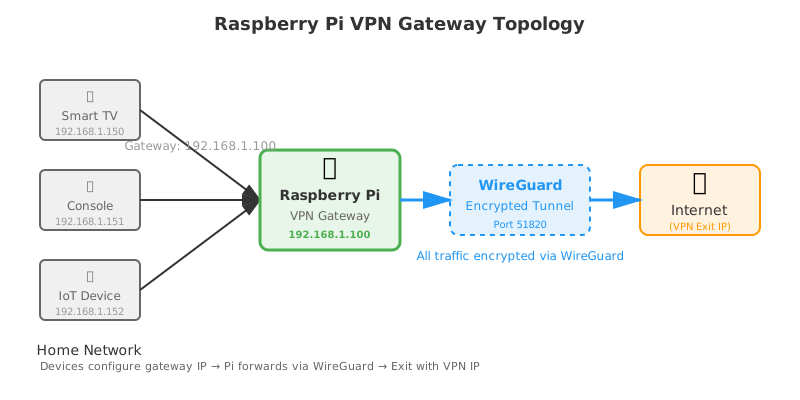
Your devices → Raspberry Pi (gateway) → WireGuard VPN tunnel → Internet
The Pi sits between your devices and the internet, routing all traffic through the VPN.
⚙️ Step-by-Step Setup
1. Install WireGuard
SSH into your Raspberry Pi and install WireGuard:
sudo apt update
sudo apt install wireguard wireguard-tools resolvconf
WireGuard is lightweight — the installation takes seconds.
2. Setting Up ProtonVPN on Raspberry Pi: Get Your WireGuard Config
Option A: ProtonVPN Dashboard (Manual)
- Log in to your ProtonVPN account
- Go to Downloads → WireGuard configuration
- Select a server (I use Singapore for low latency)
- Download the
.conffile
Option B: ProtonVPN Linux CLI (Beta)
ProtonVPN launched a Linux CLI in late 2025. If you prefer automation:
# Install ProtonVPN CLI (check official docs for latest)
wget https://protonvpn.com/download/linux-cli.deb
sudo dpkg -i linux-cli.deb

# Login and connect
protonvpn-cli login
protonvpn-cli connect --fastest
For this guide, I’ll use manual config (Option A) for better control.
3. Configure WireGuard
Copy your downloaded config to the Pi. Your config file looks like this:
[Interface]
PrivateKey = <your-private-key>
Address = 10.2.0.2/32
DNS = 10.2.0.1

[Peer]
PublicKey = <server-public-key>
AllowedIPs = 0.0.0.0/0
Endpoint = <server-ip>:51820
Place it in /etc/wireguard/wg0.conf:
sudo nano /etc/wireguard/wg0.confPaste your config, save, and secure the file:
sudo chmod 600 /etc/wireguard/wg0.conf
sudo chown root:root /etc/wireguard/wg0.conf
⚠️ Security: WireGuard configs contain private keys. Always use chmod 600.
4. Test the VPN Connection
Start WireGuard manually first to verify it works:
sudo wg-quick up wg0You should see output like:
[#] ip link add wg0 type wireguard
[#] wg setconf wg0 /dev/fd/63
[#] ip -4 address add 10.2.0.2/32 dev wg0
[#] ip link set mtu 1420 up dev wg0
[#] wg set wg0 fwmark 51820
[#] ip -4 route add 0.0.0.0/0 dev wg0 table 51820
Check your connection:
sudo wg show
curl ifconfig.me
The IP address should match your VPN server location, not your real ISP.
To stop:
sudo wg-quick down wg05. Enable WireGuard on Boot
Once verified, enable automatic startup:
sudo systemctl enable wg-quick@wg0
sudo systemctl start wg-quick@wg0
Check status:
sudo systemctl status wg-quick@wg0Your VPN now starts automatically on boot.
🌐 Configure IP Forwarding and Gateway Routing
Now we turn the Pi into a proper gateway.
Step 1: Enable IP Forwarding
Edit /etc/sysctl.conf:
sudo nano /etc/sysctl.confUncomment or add this line:
net.ipv4.ip_forward=1Apply immediately:
sudo sysctl -pVerify:
cat /proc/sys/net/ipv4/ip_forward
# Should output: 1
Step 2: Configure iptables NAT
Add a MASQUERADE rule so traffic from your devices gets routed through the VPN:
sudo iptables -t nat -A POSTROUTING -o wg0 -j MASQUERADE
sudo iptables -A FORWARD -i eth0 -o wg0 -j ACCEPT
sudo iptables -A FORWARD -i wg0 -o eth0 -m state --state RELATED,ESTABLISHED -j ACCEPT
Replace eth0 with your Pi’s network interface (check with ip a). For Wi-Fi, it might be wlan0.
Step 3: Make iptables Rules Persistent
Install iptables-persistent:
sudo apt install iptables-persistentSave current rules:
sudo netfilter-persistent saveRules will now survive reboots.
🔒 Security Improvements
1. VPN Kill Switch
Prevent traffic leaks if the VPN drops. Add this to your iptables rules:
# Block all traffic by default
sudo iptables -P FORWARD DROP

# Allow only VPN traffic
sudo iptables -A FORWARD -i eth0 -o wg0 -j ACCEPT
sudo iptables -A FORWARD -i wg0 -o eth0 -m state --state RELATED,ESTABLISHED -j ACCEPT

# Allow local network traffic
sudo iptables -A FORWARD -i eth0 -o eth0 -j ACCEPT

# Save rules
sudo netfilter-persistent save
Now if WireGuard fails, no traffic leaks to your ISP.
2. DNS Leak Prevention
Your WireGuard config should include a DNS line:
[Interface]
DNS = 10.2.0.1
This uses ProtonVPN’s internal DNS. To verify no DNS leaks:
dig @8.8.8.8 whoami.akamai.net +shortThe IP should match your VPN exit node.
3. File Permissions Recap
Always:
sudo chmod 600 /etc/wireguard/wg0.confNever commit WireGuard configs to git. Never share your private key.
💻 Connecting Your Devices
Now comes the fun part: routing devices through the gateway.
On Your Device (e.g., Smart TV, Gaming Console)
- Open network settings
- Switch from DHCP to Manual/Static IP
- Configure:
- IP Address: Pick an unused IP on your subnet (e.g.,
192.168.1.150) - Subnet Mask: Usually
255.255.255.0 - Gateway: Your Raspberry Pi’s IP (e.g.,
192.168.1.100) - DNS:
1.1.1.1or your Pi’s IP if running a DNS server
- IP Address: Pick an unused IP on your subnet (e.g.,
Save and test by loading a website or checking your IP.
Verifying from the Device
On a device with a browser:
- Visit ifconfig.me
- You should see your VPN exit IP, not your real ISP IP
For devices without browsers (e.g., IoT), check your Pi’s logs:
sudo wg show
# Look for recent handshakes
📈 Performance Notes
WireGuard is fast. On a Raspberry Pi 4:
- Throughput: ~400 Mbps (compared to ~100 Mbps with OpenVPN)
- CPU usage: ~15% at full load (OpenVPN would max out)
- Latency: Near-native — perfect for gaming
On older Pi models (3B+), expect ~150-200 Mbps. Still excellent for most use cases.
🔧 Troubleshooting
VPN won’t start
Check logs:
sudo journalctl -u wg-quick@wg0 -n 50Common issues:
- Firewall blocking port 51820
- Incorrect private key in config
- DNS resolution failing
Devices can’t connect
Verify IP forwarding:
cat /proc/sys/net/ipv4/ip_forward
# Should be 1
Check iptables rules:
sudo iptables -t nat -L -vVPN connected but no internet
Test from the Pi first:
curl ifconfig.meIf the Pi works but devices don’t, the issue is routing/iptables.
🏁 The Takeaway
For the cost of a Raspberry Pi ($50-100 AUD) and a VPN subscription (~$10/month), you get:
- 🔒 Privacy from your ISP and smart device manufacturers
- 🌐 Access to geo-restricted content on any device
- ⚙️ Control over which devices use the VPN
- ⚡ Modern protocol (WireGuard) with excellent performance
My Samsung TV now thinks it’s in Singapore. My IoT devices can’t phone home without going through ProtonVPN. And I have peace of mind.
Worth the afternoon of tinkering. 🔐
📝 Legacy Note: OpenVPN
If you’re still using OpenVPN configs from the 2023 version of this guide, migrate to WireGuard. ProtonVPN is phasing out legacy OpenVPN in 2026.
The old OpenVPN setup worked, but WireGuard is:
- Faster (especially on low-power devices)
- More secure (modern cryptography)
- Easier to debug (simpler codebase)
Migration takes ~15 minutes. Your future self will thank you.