Building Skills for Claude: A Practical Guide
Anthropic's official patterns for building Claude skills. Progressive disclosure, trigger design, multi-agent workflows from 16 production skill upgrades.
I’ve been running a multi-agent AI system for a few weeks now, and early on I made a classic mistake: I dumped everything into the system prompt. Every instruction, every preference, every workflow — all crammed into one giant block of text. The agent dutifully ignored about half of it.
The fix was skills — modular instruction sets that load only when relevant. After upgrading 16 production skills based on Anthropic’s official guide released earlier this month, here’s what I learned about building skills that actually work.
What Skills Actually Are
A skill is a folder with a SKILL.md file and optional supporting resources:
my-skill/
├── SKILL.md          # Instructions (required)
├── scripts/          # Executable code
├── references/       # Docs loaded on demand
└── assets/           # Templates, fonts, etc.
The key insight is progressive disclosure. Your agent doesn’t load every skill at startup. It reads a short description of each skill, decides which one applies, then loads just that skill’s instructions. Think of it like a library — you browse the catalog, then pull the book you need off the shelf.
This matters because context is expensive. Every token in your system prompt is a token that isn’t available for actual reasoning. Skills keep the prompt lean until the moment expertise is needed.
The Three Levels
Anthropic’s guide describes three tiers of context loading:
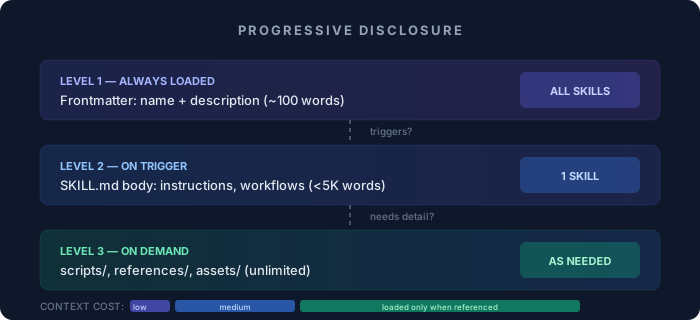
| Level | What | When Loaded | Budget |
|---|---|---|---|
| 1. Frontmatter | Name + description | Always visible | ~100 words |
| 2. SKILL.md body | Full instructions | When skill triggers | <5,000 words |
| 3. Bundled resources | Scripts, references | On demand | Unlimited |
Level 1 is the most important and the most misunderstood. The description is the only thing the agent sees before deciding whether to load a skill. If your description is vague — “helps with projects” — the agent won’t know when to use it. If it’s too broad, it’ll trigger on everything.
Good descriptions are specific and include trigger phrases:
# ✅ Specific, includes triggers
description: >
  Systematic debugging methodology — ALWAYS find root cause
  before attempting fixes. Use for ANY bug, test failure,
  or unexpected behavior BEFORE proposing solutions.

# ❌ Vague — when does this trigger?
description: Helps debug things.
The Three Skill Categories
After building 16 skills, I’ve found they fall into three natural categories:
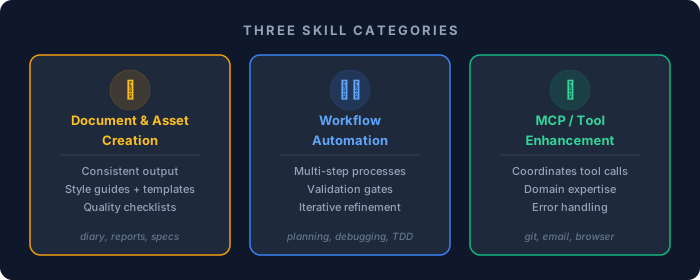
1. Document & Asset Creation
These skills produce consistent output — reports, code files, design specs. They embed style guides and quality checklists so the agent doesn’t reinvent the format every time.
My daily-diary skill transforms raw technical logs into narrative blog entries. It knows the format, the tone, the structure. Without it, every diary entry would require re-explaining the style.
2. Workflow Automation
Multi-step processes that need consistency. My writing-plans skill enforces a specific planning methodology: break work into 2-5 minute tasks, document files and code for each step, include testing and verification. Without the skill, the agent would plan differently every time.
The pattern here is step-by-step workflows with validation gates between steps. The skill doesn’t just describe what to do — it describes when to stop and verify before continuing.
3. MCP/Tool Enhancement
These are the interesting ones. MCP gives your agent access to tools (databases, APIs, file systems). Skills tell the agent how to use those tools effectively. The analogy from Anthropic’s guide is perfect: MCP is a professional kitchen (ingredients + equipment), skills are recipes (step-by-step instructions).
My systematic-debugging skill doesn’t give the agent any new tools. It just enforces a methodology: investigate root cause before attempting fixes, form hypotheses, test them, verify. The tools were always there — the skill adds the discipline.
A Complete Skill Example
Here’s a real skill I use for systematic debugging. Notice how the frontmatter description carries all the trigger logic:
---
name: systematic-debugging
description: >
  Systematic debugging methodology — ALWAYS find root cause before
  attempting fixes. Use for ANY bug, test failure, or unexpected
  behavior BEFORE proposing solutions. Four phases: root cause
  investigation, pattern analysis, hypothesis testing, implementation.
  Triggers on: bug reports, test failures, broken, not working,
  error messages, unexpected behavior, regression.
---
And the SKILL.md body contains the methodology:
# Systematic Debugging

## Phase 1: Investigate (DO NOT SKIP)
Before proposing ANY fix:
1. Read the actual error message/stack trace
2. Identify the exact file and line number
3. Check git blame — when was this last changed?
4. Reproduce the failure locally

## Phase 2: Hypothesize
- Form 2-3 hypotheses for root cause
- Rank by likelihood
- Identify what evidence would confirm/deny each

## Phase 3: Test
- Test most likely hypothesis first
- If disproven, move to next — don't guess
- Document what you tried and why it failed

## Phase 4: Fix + Verify
- Implement the minimal fix
- Run the failing test — it must pass
- Run the full test suite — no regressions
- STOP: Show verification evidence before claiming done

## Kill Conditions
- If > 30 minutes without progress, escalate
- If fix requires changing > 3 files, pause and reassess
The key: the body is only loaded after the agent sees a bug report. The trigger phrases in the description — “bug reports, test failures, broken, not working” — are what activate it.
What I Got Wrong (And Fixed)
Mistake 1: Putting trigger logic in the body
I originally wrote descriptions like “Security audit skill” and put all the trigger conditions inside the SKILL.md body. Problem: the agent never sees the body until after it decides to load the skill. If the trigger conditions are in the body, it’s already too late.
Fix: Move all trigger phrases into the description field. “Use when user asks for security audits, firewall checks, SSH hardening, credential scans, or vulnerability reviews.”
Mistake 2: Skills that are too broad
My first attempt at a “code review” skill triggered on everything involving code. Writing code, debugging code, reading code, talking about code. It was basically always loaded, defeating the purpose of progressive disclosure.
Fix: Narrow the scope. Instead of one “code” skill, I built separate skills for debugging, test-driven development, plan writing, and plan execution. Each triggers on specific scenarios.
Mistake 3: Not including kill conditions
Some skills describe what to do but not when to stop. My planning skill would generate increasingly granular plans until I interrupted it. Adding explicit kill conditions — “stop when tasks are 2-5 minutes each, don’t decompose further” — fixed the runaway behavior.
Mistake 4: No verification gates
Early skills described workflows without checkpoints. The agent would blast through all steps and present a final result with no opportunity to catch errors mid-stream. Adding verification gates (“run tests before proceeding to step 3”) catches failures early.
The Description Is Everything
I can’t stress this enough. The description field does more work than the entire body of the skill. Here’s my template:
description: >
  [What it does in one sentence].
  [When to use it — specific triggers].
  [Key constraint or methodology].
For example:
description: >
  Execute implementation plans by dispatching one sub-agent
  per task with two-stage review. Use when tasks are mostly
  independent and staying in current session. Triggers on:
  execute plan, implement here, subagent per task.
This tells the agent: what (dispatching sub-agents), when (plan execution time), and how (two-stage review). In 40 words.
Skill Interactions
Once you have multiple skills, they start interacting. My writing-plans skill creates plans. My executing-plans skill executes them. My verification-before-completion skill prevents either from claiming “done” without evidence.
This creates a natural pipeline:
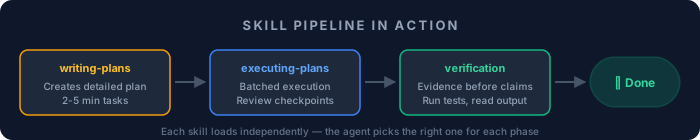
Each skill is independent, but together they enforce a discipline that no single monolithic prompt could match. The agent loads the right skill at the right phase of work.
Practical Tips
Keep SKILL.md under 500 lines. If it’s longer, move reference material into the references/ folder and load it on demand.
Use scripts for repeatable work. If your skill involves running the same shell commands or Python scripts, put them in scripts/ rather than inlining them in the instructions. The agent can execute them directly.
Test with adversarial prompts. Ask the agent something ambiguous and see which skill it loads. If the wrong one triggers, refine your descriptions.
Version your skills in git. Skills evolve. Track changes so you can revert when an “improvement” makes things worse.
Start with three skills, not thirty. Each skill adds cognitive overhead to the selection process. Build skills for your most common workflows first, then expand as patterns emerge.
The Meta-Lesson
The real lesson from building 16 skills isn’t about YAML formatting or folder structures. It’s about encoding expertise into systems rather than relying on memory.
Every time I explain a workflow to the agent, that knowledge exists for one session. When I encode it as a skill, it persists across every future session. The compound effect is significant — after a few weeks, the agent handles complex multi-step workflows that would have required extensive prompting on day one.
Skills are how you teach an agent to be consistently good at things, not just occasionally impressive. They’re the difference between a talented amateur and a reliable professional.
The agent learns nothing between sessions. Skills are how you remember for it.
Related Posts:
- How to Make AI Agent Skills Portable and Reusable — SKILL.md standard for cross-platform skills
- Multi-Agent Content Pipelines — Orchestrating specialized agents
- Experimenting with OpenClaw — Setting up a multi-agent system