Building with A2A: Agent-to-Agent Protocol in Practice
A practical guide to implementing Google's Agent-to-Agent (A2A) protocol — enabling AI agents to discover, negotiate, and delegate tasks to each other over HTTP.
I’ve been experimenting with multi-agent systems for a few weeks now, and one thing became clear fast: the hardest part isn’t getting a single agent to work. It’s getting multiple agents to work together. Different frameworks, different APIs, different expectations about data formats and authentication. It’s messy.
Google’s Agent-to-Agent (A2A) protocol is an attempt to solve this — a standardized way for AI agents to discover each other, negotiate capabilities, and delegate tasks without needing to know each other’s internal implementation. Originally developed by Google Cloud and donated to the Linux Foundation in June 2025, it’s now backed by major partners including Amazon Web Services, Cisco, Microsoft, Salesforce, SAP, and ServiceNow.
This isn’t theoretical protocol design. This is practical plumbing for the agentic AI ecosystem emerging right now.
What Problem Does A2A Actually Solve?
Here’s the scenario: you have an agent that handles customer support inquiries. A user asks about their order status, but your support agent doesn’t have access to the order management system — that’s handled by a different agent, possibly built by a different team, running on a different platform. Without A2A, you have a few bad options:
- Give your support agent direct database access — which violates separation of concerns and creates security nightmares
- Build a custom integration — which means maintaining bespoke code for every agent pair
- Manually copy data between systems — which defeats the point of having agents
A2A gives you a better option: your support agent discovers the order management agent’s capabilities via an “Agent Card,” sends it a task request using a standardized protocol, and receives structured results back. The agents stay opaque — they don’t share internal memory, tools, or proprietary logic. They just collaborate on completing tasks.
The Core Concepts
Agent Cards: Discovery Without Coupling
An Agent Card is a JSON document that describes what an agent can do and how to reach it. Think of it as a business card for agents:
{
  "name": "Order Management Agent",
  "description": "Handles order lookups, status checks, and cancellations",
  "url": "https://api.example.com/agents/orders",
  "capabilities": [
    {
      "name": "check_order_status",
      "description": "Get current status of an order",
      "input_schema": {
        "type": "object",
        "properties": {
          "order_id": {"type": "string"}
        }
      }
    }
  ],
  "auth": {
    "type": "oauth2"
  }
}
The key here is that Agent Cards are declarative. The agent advertises what it does, not how it does it. The client agent doesn’t need to know you’re using LangGraph, or that your data lives in MongoDB, or that you’re calling three different internal APIs. It just needs to know you can check order status.
Tasks: The Unit of Collaboration
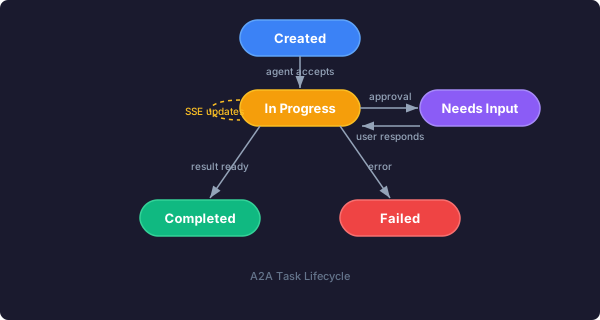
In A2A, everything revolves around tasks. A task has a lifecycle:
- Created — client agent sends a request
- In Progress — remote agent is working on it
- Completed — result is ready
- Failed — something went wrong
For quick operations, this happens synchronously. For long-running work — like generating a report that takes 10 minutes — the remote agent can return immediately with an “in progress” status and send updates via Server-Sent Events (SSE) or push notifications.
This matters. Most agent protocols assume everything is request-response. A2A was designed for the real world, where some tasks take time and you need to handle partial updates and human-in-the-loop scenarios.
Modality Negotiation: Beyond Text
Here’s where A2A gets interesting. Agents can negotiate how they want to communicate results. The protocol supports:
- Plain text responses
- Structured JSON data
- Generated files (PDFs, spreadsheets, images)
- Interactive forms
- Audio/video streaming
- Custom UI components (iframes, web components)
When a task completes, the result includes “parts” — each with a specified content type. The client agent can request formats it supports, and the remote agent provides the best match. If your client only handles text but the remote agent can generate rich UI, the protocol handles that gracefully.
Building an A2A-Compliant Agent
Let’s walk through what it looks like to build an agent that speaks A2A. I’ll use Python since that’s where most of the tooling is, but the concepts apply to any language.
Installing the SDK
pip install a2a-sdkThe A2A Python SDK handles the protocol details — JSON-RPC 2.0 message formatting, SSE streaming, auth handling. You focus on the business logic.
Creating a Simple Agent Server
from a2a import Agent, Task, Capability

# Define what your agent can do
weather_capability = Capability(
    name="get_weather",
    description="Get current weather for a location",
    input_schema={
        "type": "object",
        "properties": {
            "location": {"type": "string", "description": "City name"}
        },
        "required": ["location"]
    }
)

# Create the agent
agent = Agent(
    name="Weather Agent",
    description="Provides real-time weather information",
    capabilities=[weather_capability]
)

# Handle task execution
@agent.on_task("get_weather")
async def handle_weather_request(task: Task):
    location = task.input["location"]

    # Your actual logic here — call weather API, etc.
    weather_data = fetch_weather(location)

    # Return structured result
    return {
        "temperature": weather_data["temp"],
        "condition": weather_data["condition"],
        "humidity": weather_data["humidity"]
    }

# Run the server
agent.serve(host="0.0.0.0", port=8080)
That’s it. You now have an A2A-compliant agent server running on HTTP. Any A2A client can discover your capabilities via the automatically-generated Agent Card at http://your-server:8080/.well-known/agent.json and send tasks to you.
Creating a Client Agent
On the client side, connecting to an A2A agent looks like this:
from a2a import Client

# Connect to remote agent
client = Client("https://api.example.com/agents/weather")

# Discover capabilities
capabilities = await client.get_capabilities()
print(f"Agent can: {[c.name for c in capabilities]}")

# Send a task
result = await client.execute_task(
    capability="get_weather",
    input={"location": "Sydney"}
)

print(f"Temperature: {result['temperature']}°C")
The client doesn’t need to know anything about the weather agent’s internals. It discovers capabilities dynamically and uses them.
A2A vs. MCP: When to Use Which
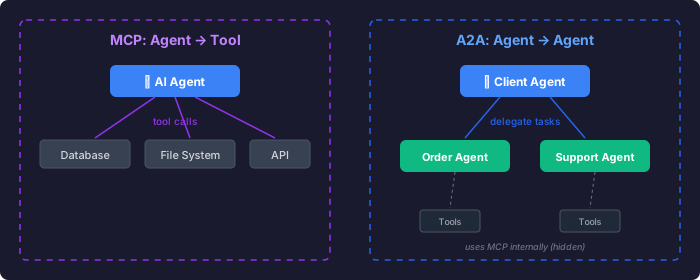
If you’ve been following the agentic AI space, you’ve heard of Anthropic’s Model Context Protocol (MCP) as well. Both are open protocols, both involve agents and tools, but they solve different problems.
MCP is agent-to-tool communication. It’s about giving an AI agent access to your databases, file systems, APIs, and business tools. When you connect Claude Desktop to your Notion workspace via MCP, you’re saying “here are the tools you can use on my behalf.”
A2A is agent-to-agent delegation. It’s about one agent asking another agent to do something. The receiving agent might use MCP internally to access its tools, but that’s hidden from the requesting agent.
Think of it this way:
- MCP: “I’ll give you access to my tools so you can work”
- A2A: “I’ll ask you to do this work and you tell me when it’s done”
In practice, they’re complementary. You might build an agent using Google’s ADK framework, equip it with tools via MCP, and expose it to other agents via A2A. Each layer serves a different purpose.
The Broader Agent Protocol Landscape
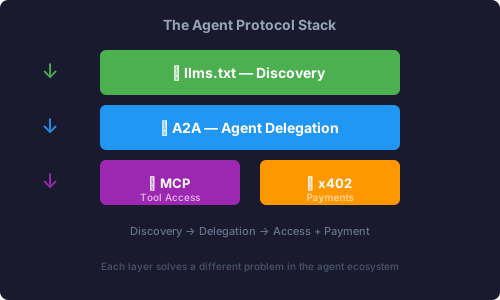
A2A isn’t the only protocol emerging in this space. There’s an entire ecosystem forming:
llms.txt: Lightweight Discovery
Before agents can delegate via A2A, they need to know which agents exist and what they do. llms.txt is a simple markdown file that websites can publish to tell AI agents what they offer:
# Our Services

## Order Management
URL: https://api.example.com/agents/orders
Capabilities: Check order status, cancel orders, update shipping

## Customer Support
URL: https://api.example.com/agents/support
Capabilities: Answer questions, file tickets, escalate issues
It’s the robots.txt of the agent era — dead simple, easy to implement, low overhead. A2A’s discovery mechanisms support llms.txt lookups.
x402: Agent Payments
As agents start doing real work for each other, payment becomes necessary. The x402 protocol defines how agents can charge for and pay for services. Your travel planning agent could pay a restaurant booking agent to make reservations, all programmatically.
This gets fascinating when you consider that agents could have budgets, make economic decisions, and operate semi-autonomously in a marketplace of agent services. We’re not quite there yet, but the protocol is being designed with this in mind.
Practical Implementation Patterns
After experimenting with A2A in a few projects, here are the patterns that work well:
Pattern 1: Capability-Based Routing
Don’t hard-code which agent handles what. Instead, have a coordinator agent that:
- Receives a high-level request from the user
- Queries available agents for their capabilities
- Selects the best match based on task requirements
- Delegates the task via A2A
- Aggregates and presents results
This keeps your system flexible. When you add a new agent, it automatically becomes available to the coordinator without code changes.
Pattern 2: Progressive Enhancement
Not all agents support all modalities. Design your client agents to request rich formats (interactive forms, custom UI) but gracefully fall back to text or JSON when the remote agent doesn’t support them.
# Request preferred formats, accept fallbacks
result = await client.execute_task(
    capability="generate_report",
    input={"report_type": "quarterly_sales"},
    preferred_formats=["application/pdf", "text/html", "application/json"]
)
The remote agent returns the richest format it can produce from your preference list.
Pattern 3: Long-Running Task Monitoring
For tasks that take time, use streaming updates to keep the user informed:
async for update in client.execute_task_streaming(
    capability="analyze_dataset",
    input={"dataset_url": "https://..."}
):
    if update.status == "progress":
        print(f"Progress: {update.message}")
    elif update.status == "completed":
        print(f"Result: {update.artifact}")
This is especially important when humans are in the loop — if an agent needs approval to proceed, the stream can include a prompt, wait for user input, and continue.
Security Considerations
A2A was designed with enterprise deployment in mind. A few things to think about:
Authentication: A2A supports OAuth2, API keys, and custom auth schemes. Don’t expose agent endpoints without auth. Ever.
Authorization: Just because an agent can call yours doesn’t mean it should have full access. Implement capability-level permissions. Maybe your finance agent can query data but not approve transactions.
Audit Logging: Log all task requests and completions. When agents make decisions on behalf of users, you need a trail.
Rate Limiting: Agents can spam each other just like humans can spam APIs. Implement sensible rate limits per client.
Input Validation: The same security principles apply. Don’t trust task inputs. Validate against your schema. Sanitize before passing to internal systems.
What This Enables
The interesting thing about A2A isn’t the protocol itself — it’s what becomes possible when agents can reliably delegate to each other.
Multi-Framework Orchestration: Your LangGraph agent can delegate to a Google ADK agent, which delegates to a custom-built specialist. They all speak the same language.
Specialization Without Silos: Instead of building one mega-agent that does everything poorly, you build focused agents that do specific things well and chain them together.
Marketplaces of Capability: Imagine a directory of A2A-compliant agents — some free, some paid — that your agents can discover and use on demand. Need translation? Call the translation agent. Need data analysis? Call the analytics agent. Your agent doesn’t need to be good at everything.
Gradual Migration: You can wrap legacy systems with A2A adapters and have them participate in your agentic ecosystem without rewriting everything at once.
Current State and What’s Next
A2A is still evolving. The spec is at v0.3.0, the SDKs are maturing, and real-world deployments are teaching us what works and what doesn’t. Google and partners are aiming for a production-ready v1.0 later this year.
Current gaps being addressed:
- Dynamic skill discovery — agents querying for capabilities at runtime, not just at startup
- Enhanced streaming — better reliability for long-lived connections
- Authorization within Agent Cards — including credentials and permission schemes directly in discovery
- Richer lifecycle management — pausing, resuming, and canceling tasks
If you’re building agent systems now, it’s worth prototyping with A2A even before v1.0. The core concepts are stable enough to start building on, and early feedback is shaping the final spec.
Should You Use A2A?
Use A2A if:
- You’re building multiple specialized agents that need to collaborate
- You want agents from different teams or vendors to interoperate
- You have long-running tasks that need lifecycle management
- You care about keeping agent internals opaque for security or IP reasons
Don’t use A2A if:
- You have a single agent that just needs tool access (use MCP instead)
- Everything is simple request-response with no delegation
- You’re building a toy project where standards overhead isn’t worth it
For anything with 3+ agents that need to work together, the standardization pays off fast.
Getting Started
- Read the spec: a2a-protocol.org
- Try the Python SDK:
pip install a2a-sdk - Walk through examples: github.com/a2aproject/a2a-samples
- Take the DeepLearning.AI course: Free short course on A2A fundamentals
Start simple. Build a weather agent and a client that calls it. Then add a second agent and route between them. The concepts click when you see them working.
The agent ecosystem is still forming. Protocols like A2A, MCP, x402, and discovery via llms.txt are creating the plumbing that makes it possible for agents to work together without tight coupling. Whether these specific protocols win or get replaced by something better, the core need — standardized agent interoperability — isn’t going away.
We’re building the HTTP of the agentic era. It’s still early. That makes it a good time to experiment.
Related
- Building Skills for Claude: A Practical Guide — how to structure modular instructions for AI agents, complementary to A2A’s agent-to-agent patterns
- x402: Monetizing Content for AI Agents — setting up programmatic payments between agents using HTTP 402
- Experimenting with OpenClaw: Running a Multi-Agent AI System — practical lessons from operating multiple specialized agents